
 Python
 A few weeks ago I typed this into a terminal:
“Set up a recurring team standup on weekday mornings, but skip Fridays.”
A couple of seconds later my calendar showed a proposed event — and then it stopped and waited. It didn’t save anything. It showed me the fully expanded recurrence (every occurrence, in my timezone, with Fridays already removed) and asked one question:
Create Recurring: Team Standup
  When: 2026-08-03T09:15:00-04:00 (America/New_York), 15 min
  Repeats: Every week on Mon, Tue, Wed, Thu
approve? [y / n / or type feedback] >
Only after I typed y did it write to my live WebCalendar instance. That pause — the moment where a human confirms before anything changes — is the entire design philosophy of the project I want to walk through here.
I built scheduling-agent with two goals at once: a genuinely useful personal tool, and a serious exercise in the engineering that separates a production LLM agent from a chatbot demo. This post is about the second part — the patterns that make an agent trustworthy enough to touch real data.
Why Not Just Ask the Model for an Event?
The naïve version of this is one prompt: “Here’s a request, give me back a calendar event as JSON.” It works in a demo and fails in practice, for three predictable reasons.
- It hallucinates structure. Recurrence rules (the RFC 5545
RRULEstandard) have real constraints, and models happily invent ones a calendar backend can’t actually store or expand. - It gets time subtly wrong. Timezones, daylight saving, “next Tuesday” — these are exactly the details an LLM fumbles, and a calendar that’s off by an hour is worse than no calendar.
- It writes blindly. A model that can silently create, move, or delete events on your real calendar is a liability, not an assistant.
So the interesting work isn’t the prompt. It’s the machinery around it that turns a fuzzy sentence into something validated, time-correct, and never written without consent.
The Shape: A Graph, Not a Prompt
The agent is a small state machine built with LangGraph. Each step is a node, and the model is only responsible for one of them:
parse_intent → gather_context → propose → [human approval] → execute → verify → respond- parse_intent is the only place the LLM runs. It maps natural language to a structured
ScheduleProposal— nothing more. - gather_context and execute call the calendar; propose builds and validates the recurrence; verify reads the event back after writing.
- human approval is a real interrupt. The graph pauses, and its entire state is checkpointed to SQLite.
That checkpoint is worth dwelling on. Because the pause is durable, I can close the process, come back later, and resume exactly where I left off — the pending approval survives a restart. Reject a proposal with feedback (“make it 30 minutes”) and the graph loops back to parse_intent with your note attached, rather than starting over. The model does language; the graph does orchestration, in ordinary code I can test.
Structured Output You Can Actually Trust
The bridge between “free text” and “typed data” is the part that most often breaks. My rule was that nothing free-form is ever trusted: the model’s only job is to fill in a validated schema.
Where the provider supports it, I use native json_schema structured output — the model is constrained at the API level to emit an object matching my ScheduleProposal schema. Where it doesn’t (say, a model running through a subscription CLI), the agent falls back to a validate-and-repair loop: parse the JSON, and if it doesn’t validate, hand the error back to the model and ask for a correction, a bounded number of times.
The payoff is that the provider becomes a swappable detail. The same agent runs against the Anthropic API, OpenRouter, an Anthropic Pro/Max subscription, or a fully local model through ollama or LM Studio — no cloud key required. Provider quality stops being a source of mystery bugs and becomes a number I can measure (more on that below). A single structured log line tells me which path ran:
{"message": "llm_invoke", "provider": "lmstudio", "model": "qwen2.5",
 "schema": "ScheduleProposal", "mode": "json_schema"}
Seeing It Work (in the Browser)
The agent ships with a small web UI alongside the CLI. Here’s a real session — and to make the “no cloud key required” point concrete, I ran this one entirely on my own hardware: LM Studio on a MacBook on my LAN, serving the model over the network. Nothing left the house.
First I just asked what was on my calendar:
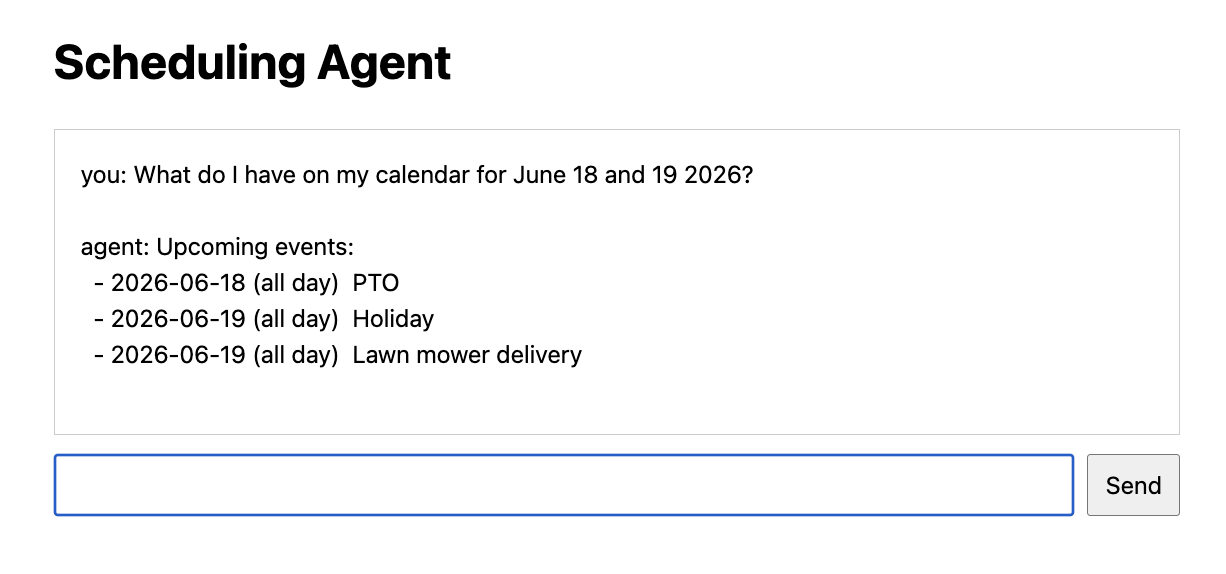
list_events tool.That answer comes straight from WebCalendar through the MCP list_events tool — timezone-converted and filtered to real, non-deleted events (two bugs I’ll get to in a moment).
Then, in the same conversation, I asked it to add something:
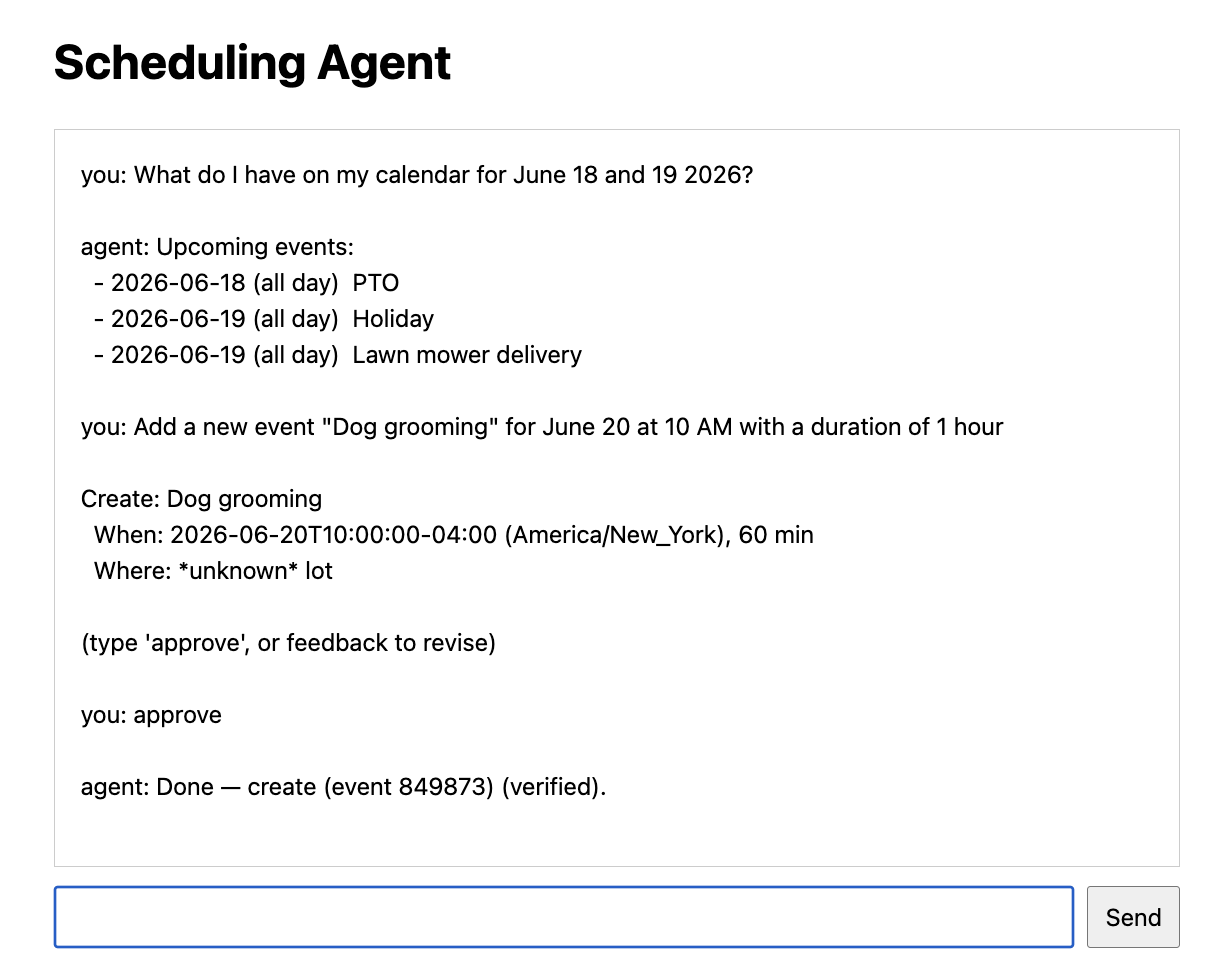
Notice what it did — and didn’t — do. It parsed “June 20 at 10 AM for 1 hour” into a concrete, timezone-aware proposal (2026-06-20T10:00:00-04:00, America/New_York, 60 min) and then stopped. Nothing was written until I typed approve. Only then did it create the event and read it back to confirm: “Done — create (event 849873) (verified).”
Meanwhile the server narrated the whole thing in structured logs. Here’s the run, trimmed — note provider: lmstudio (the local MacBook) and the MCP tool calls behind each step:
{"message": "llm_invoke", "provider": "lmstudio", "model": "local-model", "schema": "ScheduleProposal", "mode": "json_schema"}
{"message": "llm_response", "provider": "lmstudio", "model": "local-model", "elapsed_ms": 5852}
{"message": "mcp_request", "tool": "list_events"}
{"message": "mcp_result", "tool": "list_events", "ok": true, "elapsed_ms": 257}
{"message": "mcp_request", "tool": "check_conflicts"}
{"message": "mcp_result", "tool": "check_conflicts", "ok": true, "elapsed_ms": 229}
{"message": "mcp_request", "tool": "add_event"}
{"message": "mcp_result", "tool": "add_event", "ok": true, "elapsed_ms": 208}
Every step is on the record: which model ran, how long it took, and which calendar tools it called. When I ask “why did the agent do that?”, this is the answer — not a guess.
Correctness as a Feature
Here’s the part I’m most proud of, because it’s where “AI project” meets “twenty years of maintaining a calendar app.”
WebCalendar has always had a server-side validator for what recurrence patterns it can store and expand. Rather than hope the model stays inside those limits, I wrote a Python twin of that validator and run every proposed rule through it before anything is sent. If the model dreams up FREQ=HOURLY or a bad BYSETPOS, the agent catches it and replans — the backend never sees an invalid rule.
On top of that, the agent expands each recurrence into concrete occurrences using timezone-aware logic, so the approval screen shows you the actual dates — DST transitions included. “Weekday mornings except Fridays” becomes a list you can eyeball before committing. The philosophy: never propose something the backend can’t honor, and always show the human what will really happen.
Meeting Reality: MCP and a Parade of Timezone Bugs
The agent talks to WebCalendar through an MCP (Model Context Protocol) server I added to the app itself — a set of tools like add_event, search_events, and check_conflicts, gated behind an admin write-access setting. Building the agent and the server together meant the integration surfaced honest bugs that only appear against a live instance:
- GMT vs. local. Events are stored in GMT. An early “list my upcoming events” answer showed times four hours off and even leaked in an event from “last night,” because it was reading the storage frame instead of converting to my timezone. The fix was routing listing queries through the tool that does local conversion and local-date filtering.
- Deleted events that wouldn’t stay deleted. WebCalendar soft-deletes (it flags a row rather than removing it), and the MCP read tools weren’t filtering those out — so events I’d deleted in the UI kept showing up in the agent’s answers. One
WHEREclause, matching what the core UI already does. - Auth behind Apache. A token that worked everywhere else failed through the agent, because the web server was stripping the header the MCP client relied on.
None of these are glamorous, but they’re the real content of shipping an agent against production data — and each one turned into a small, tested fix merged back into WebCalendar (#668, #670, #671).
Evals Were the Real Unlock
If there’s one habit I’d press on anyone building with LLMs, it’s this: write evaluations from day one. I keep a small golden dataset of scheduling requests — recurrence, avoid-Fridays constraints, BYSETPOS, DST spring-forward and fall-back, updates, deletes, queries — each scored by deterministic checks: Is the RRULE valid? Do the occurrences land on the right weekdays? Is the local hour correct across a DST boundary?
The deterministic scorers run in CI with no model involved, so a regression in my recurrence logic fails the build. A separate “agent mode” runs the real graph against whatever provider I’ve configured, which is how I compare models apples-to-apples instead of by vibes. Combined with structured JSON logging and optional tracing, “why did the agent do that?” is a question I can answer from the record rather than by guessing.
Takeaways
Building this reinforced a few things I’ll carry into the next agent:
- Put the model in a box. Its job is language-to-schema. Orchestration, validation, and writes belong in code you can test — 186 tests and 100% coverage, in my case, precisely because so little depends on the model behaving.
- Human-in-the-loop is a feature, not a fallback. A durable approval step makes an agent that touches real data something you can actually trust.
- Domain rigor beats model size. A Python twin of a battle-tested validator did more for correctness than any amount of prompt tuning.
- Evals turn “it feels better” into a number. They’re the difference between iterating and guessing.
The code is on GitHub at craigk5n/scheduling-agent, and the MCP server that makes it possible ships inside WebCalendar. If you run WebCalendar and want to try talking to your calendar in plain English — carefully — that’s exactly what it’s for.



Human-in-the-loop scheduling combines AI-based scheduling with human oversight during the decision-making process. The approach allows automated agents to handle scheduling tasks while people can review, adjust, or approve decisions when needed.