
 Python
 I’m excited to share my latest project: k5n-mcp-hub, a small, local-first hub for the MCP servers you build and run on your own machine. The code, docs, and a Dockerfile are on GitHub:
https://github.com/craigk5n/k5n-mcp-hub
The Model Context Protocol (MCP) has quickly become the way to connect AI assistants to tools, data, and services. If you build with MCP, you accumulate servers fast — a filesystem server here, a database server there, a couple of internal ones, and a few you’re just evaluating. Before long you want a single place to register them, check whether they’re healthy, poke at their capabilities, and watch the traffic flowing through them.
That’s why I built k5n-mcp-hub: it bundles a registry, a reverse proxy, request tracing, health monitoring, capability discovery, fault injection, and an admin UI into one Python/FastAPI app you can run in a single process — no Postgres, no Redis, no Kubernetes required.
Table of Contents
- What It Does
- Trying It Against a Real Server: WebCalendar
- The Part I’m Most Excited About: Fault Injection
- Getting Started
- Built with AI Assistance
- Testing & Code Quality
- Where It Fits (and Where It Doesn’t)
What It Does
- Registry — register your MCP servers and discover their tools, prompts, and resources.
- Reverse proxy / gateway — route MCP calls (including streaming/SSE responses) to registered backends through one endpoint.
- Health monitoring — background health checks with configurable intervals and failure thresholds.
- Request tracing — capture request/response traffic with sensitive-header redaction, so you can see exactly what went over the wire.
- Capability & handshake inspection — view a server’s advertised tools and inspect the MCP
initializehandshake. - A JSON-RPC playground — fire hand-crafted requests at a server and read the raw response.
- Fault injection — deliberately make a server misbehave (more on this below).
- An admin web UI — do all of the above from the browser.
Trying It Against a Real Server: WebCalendar
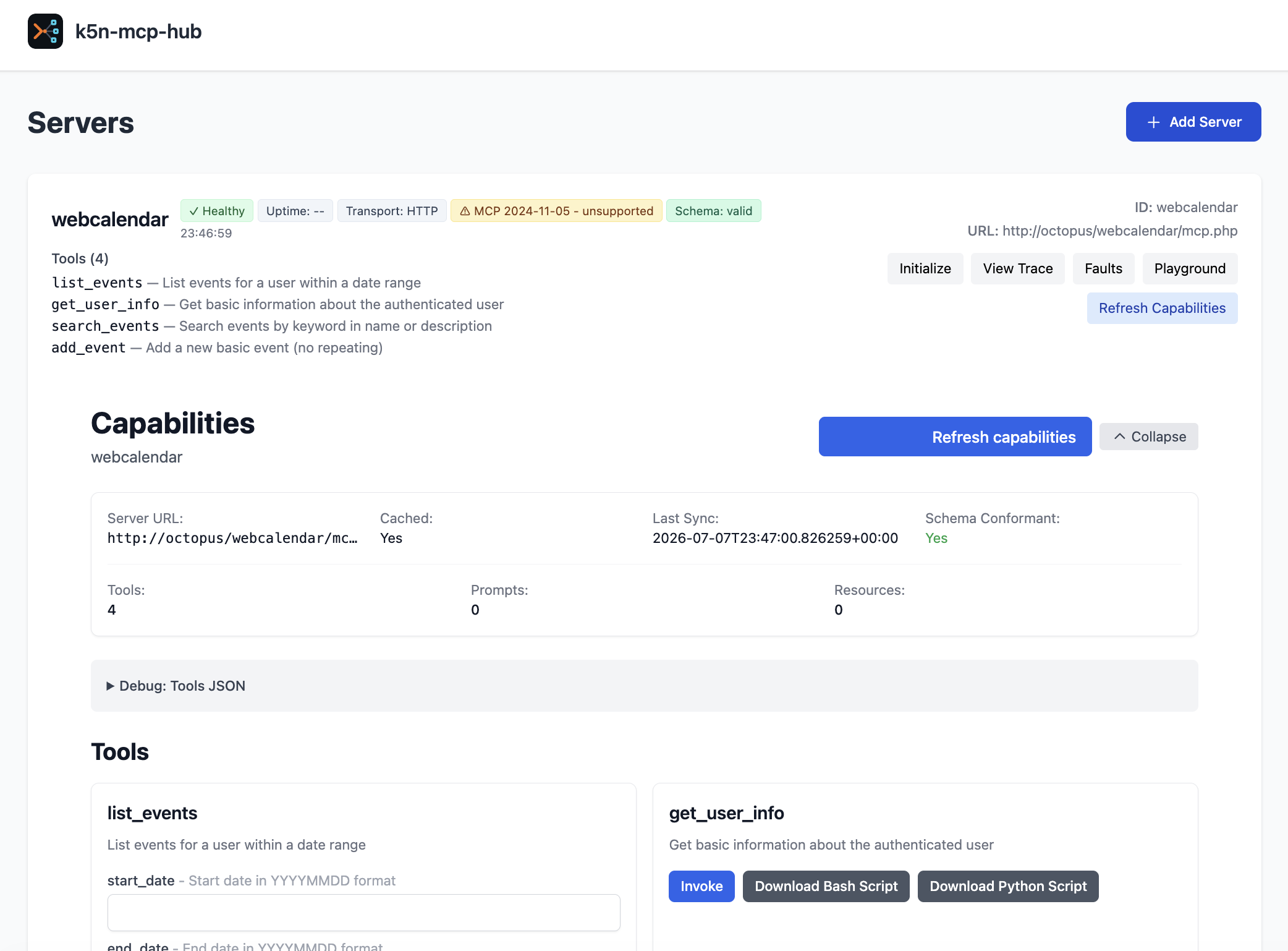
To put the hub through its paces, I registered an MCP server I built for WebCalendar, my long-running open-source calendar app. It exposes a handful of tools to AI assistants — list_events, search_events, get_user_info, and add_event — and the hub picks all of them up automatically. From one screen I can see the server’s health, transport, and schema status at a glance, browse its advertised tools, inspect the initialize handshake, replay calls in the JSON-RPC playground, and flip on faults to see how a client copes.
The Part I’m Most Excited About: Fault Injection
Most MCP tooling assumes the happy path. But real servers time out, drop streams mid-flight, and occasionally return garbage. A client or agent that has only ever seen well-behaved servers can hang, crash, or silently do the wrong thing when one misbehaves — and that’s exactly the situation you don’t want to discover in production.
k5n-mcp-hub includes a small chaos-testing harness for the MCP layer. Point your client at the hub, turn on a fault for a given server, and watch how your client copes. It can simulate:
| Fault | Simulates |
|---|---|
| SSE Interrupt | a streaming response that drops mid-stream |
| Timeout | a slow or hung server (configurable delay, then a 504) |
| Malformed JSON | a corrupt response body |
| Invalid Method | the server rejecting the call with a JSON-RPC error |
You toggle these per server from the admin UI, then send traffic through the hub and observe. It’s a quick way to answer questions like “does my agent actually retry on a timeout?” or “what happens if a tool call comes back as garbage?” — without standing up a broken server by hand. Fault injection for MCP is still genuinely rare, and it’s the feature that sets this apart from the growing pile of MCP registries and gateways.
Getting Started
It runs on Python 3.11+. The fastest path is to install from source:
pip install -e .[dev]
k5n-mcp-hub          # serves http://localhost:8080
Or with Docker:
docker build -t k5n-mcp-hub .
docker run --rm -p 8080:8080 k5n-mcp-hub
Open http://localhost:8080, click Add Server, and you’re off.
Built with AI Assistance
Like my recent php-icalendar-core library, k5n-mcp-hub was built with heavy AI assistance — and this time the tooling itself is a project of mine. It was built with agentic-dev-team, a small orchestration tool I’ve been developing that drives coding agents through a project end to end. It leans mostly on OpenCode, with Claude handling some of the work. I have a dedicated post on agentic-dev-team coming soon; for now, the repo is here: github.com/craigk5n/agentic-dev-team. As always, I reviewed, tested, and refined everything the agents produced.
Testing & Code Quality
I hold my projects to a high bar, and this one is no exception. Every push and pull request runs through GitHub Actions on a Python 3.11 and 3.12 matrix, with the build gated by Ruff (lint + format), mypy (type checking), and an 888-test pytest suite at roughly 83% coverage. A pip-audit scan also checks the declared dependencies for known vulnerabilities. As of this writing, it’s green across the board.
Where It Fits (and Where It Doesn’t)
k5n-mcp-hub is a local-first developer tool, not an enterprise gateway. It ships with sensible defaults for running on a trusted machine or LAN — it can reach localhost/LAN servers out of the box — and it’s happiest as a personal or small-team control plane and resilience testbench. If you need multi-tenant RBAC, federation, and OpenTelemetry, there are heavier tools for that. But if you want to register, inspect, trace, and deliberately break MCP servers on your own machine, this is built for you.
k5n-mcp-hub is open source under the MIT license. Give it a spin, and let me know what you’d want it to do next — issues and feedback are welcome: github.com/craigk5n/k5n-mcp-hub.



Leave a Reply