Table of Contents
Features
- Tracks time for one or more tasks simultaneously
- Group tasks by projects (optional)
- Allows text annotations to tasks
- Checks to see if you are idle. If there is no mouse or keyboard activity in 15 minutes, it will ask if you want to continue timing or revert to when you went idle.
- Generates reports showing how your time was spent each day/week/month in either plain text or HTML.
- Built using GTK+ (GTK+ 2.X required)
- Compatible with Gnome (but not required)
GTimer FAQ
- What versions of GTK+ will GTimer compile with?
- Can I get a pre-compiled binary?
- Can I get rid of the splash screen?
- Can I adjust the idle time?
- How do I get GTimer to work in French/Spanish/Your-Language-Here?
- GTimer periodically hangs. What can I do?
What versions of GTK+ will GTimer compile with?
GTimer should compile with the latest versions of GTK+ 2.X. It may also compile with older versions, but it’s always recommended you get the latest version.
Can I get a pre-compiled binary?
I don’t provide binaries but you can check with other sites for binaries.
Can I get rid of the splash screen?
Use the -nosplash option to not display the splash screen.
Can I adjust the idle time?
There is no UI for this yet, but you can carefully edit the ~/.gtimer/.gtimerrc file and edit the line that follows idle. (It’s the idle threshold in seconds.)
How do I get GTimer to work in French/Spanish/Your-Language-Here?
GTimer has internationaliztion (I18N) support. You must have the GNU gettext distribution installed. You will need to translate the provided messages.po to whatever language you want. Here’s an example for French:
- Either start with messages.po (or create your own with “xgettext *.c”)
- Copy messages.po to the new locale (Example: “cp messages.po fr.po”)
- Now edit the new .po file and replace the msgstr lines with the proper translated text.
- Now use msgfmt to build the .mo file from your .po file. (Example: “msgfmt fr.po -ogtimer.mo”)
- Make sure your LANG environment variable is set to the proper locale.
- Copy the gtimer.mo file to the proper location. I’m not if this is the same place all on system. On my system, the French gtimer.po needs to be:
/usr/share/locale/fr/LC_MESSAGES/gtimer.mo
If you’re not sure where it’s looking, on Linux try using strace to see where it’s looking:
strace gtimer |& grep LC_MESSAGES - Email me the translation file! I’ll add it to the distribution for others to use.
GTimer periodically hangs. What can I do?
Use the -noversioncheck option to keep GTimer for checking to see if a new version is available. It sometimes locks up in the HTTP request.
Screenshots
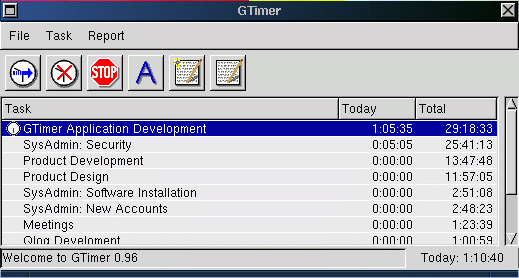
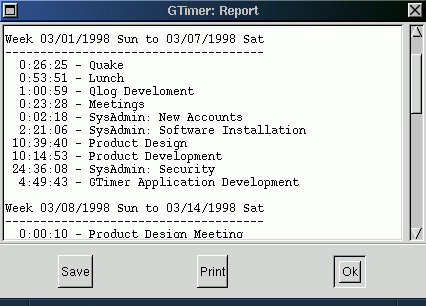
History
- 27 Mar 2010 – Release 2.0.0
- Fix crash on viewing change log window
- Update to GTK 2.0
- Inclusion or a large series of Debian patches
- 09 Mar 2003 – Release 1.1.6
- Added -resume command line option. This will start time all tasks that were being timed when the application exited last.
- Projects are now associated with a project. The project is now the first column in the main window.
- Added option to round minutes to nearest minute, 5 minutes, etc in reports window
- Added small css stylesheet to report html output.
- Added “Last Two Weeks”, “This Week & Last Week” reports
- Reread gtkrc if -dir option is supplied
- Modified http function to use “Host:” required by web sites that used virtual hosts, like www.cknudsen.com. Also improved error handling a little bit.
- 09 Mar 1999 – Release 1.1.5
- Improved idle handling. The task list is no longer re-sorted when selecting “Revert.” Added a new “Resume” option that will toss out the idle time but keep timing whatever tasks are being timed.
- Added tool to check for new version. The app will automatically check for a new version every 30 days.
- Added ability to view ChangeLog from Help menu
- 04 May 1999 – Release 1.1.4
- Oops. Fixed typo is task menu pulldown that said “seconds” instead of “minutes.”
- 03 May 1999 – Release 1.1.3
- Fixed bug where \n chars could be included at the end of a task name
- Fixed bug where adding new tasks messes up the hide/unhide stuff
- Fixed bug where -nosplash would cause the main window to not remember the correct window size.
- Added support for the X screen saver extension so idle detection will now sense keyboard events instead of just mouse events
- Added support for I18N but need translators!
- Made some windows transient (for GTK+ 1.1/1.2 only) instead of all toplevels
- Made animated clock optional
- Made toolbar optional
- Allowed main menus to be tearoffs (for GTK+ 1.1/1.2 only)
- Added -start option allowing you to specify one or more tasks to start timing when the app starts
- Added support for -version and -help options
- Added missing install-sh file to distribution
- Added FAQ.html to distribution
- Added portions of a Win32 port patch
- 17 Mar 1999 – Release 1.1.2
- Added autoconf (configure) support.
- Added back support for GTK+ 1.0 (and still works with GTK+ 1.1/1.2)
- 24 Feb 1999 – Release 1.1.1
- Added task unhide function to along with the hide function (added in a previous release).
- Added support for accelerator keys.
- Fixed support for double-clicking to switch to timing only the newly selected task (GTK+ 1.1 problem).
- Fixed support for the task pulldown menu available by right-clicking on a task in the main window (GTK+ 1.1 problem).
Downloads
Source Bundle
- gtimer-2.0.0.tar.gz (195k)
Subversion
Subversion information can be found here on SourceForge.net.
Alternatives
GTK+ is normally Linux only. If you are looking for something similar for either Windows or Mac, someone has created a Java-based (cross platform) tool “JTimer” that is very similar:
How can I edit past recorded times?
I’ve found it in .task files:
~/.gtimer/46.task
etc
If you’re talking about timestamps like “date updated”, those would need to be changed manually in the database. If you’re talking about events in the past, you can edit those the same as any other event in the future.
Hi!
I’m using GTimer 2.0.0 under Debian (11) works fine, thanks for it.
I’ve only found a small issue :
Task menu shows Actions with associeted ShortCuts,here :
* Annotate [Ctrl+A] => works 🙂
* Delete [Ctrl+A] => doesn’t work 🙁
Is there someway to get a working Delete shortcut ?
Thanks, best regards.
You can put in a pull request on Github to make the change 🙂
Was looking for a timer app to track tasks in a spreadsheet. Gtimer was a pleasant surprise with more functionality than expected. 5+
There’s a bug in the current version which prevents the montly report from working. In main.c there’s a string “RM_MOnthly” which should be “RM_Montly”. If you don’t want to recompile, you can edit the binary (if you have a good editor) to fix the error.
Woops — correct to “RM_Monthly”. Apparently I can’t type better than the author.